> ## Documentation Index
> Fetch the complete documentation index at: https://docs.blubash.io/llms.txt
> Use this file to discover all available pages before exploring further.
# Won, Lost and close reasons
> Close deals as Won or Lost with the reason recorded, set up each Pipeline's reason lists and avoid discard stages.
Every deal ends in a **Won** or **Lost** stage. When closing, the person picks a reason from the Pipeline's list. The reason stays on the deal and shows why each result happened: how many sales came from expansion, how many were lost on price, how many leads were not a fit.
## Close a deal
You can close a deal in three ways:
* **On the board**: drag the card to the **Won** or **Lost** column.
* **On the deal record**: use the close quick actions. The button shows the end stage name, such as **Won** or **Lost**.
* **On the deal record**: change the **Stage** field to an end stage.
If the Pipeline requires a reason, BluBash asks **Why did this deal win?** or **Why was this deal lost?**.
Select the reason in **Won reason** or **Lost reason**.
In **Note (optional)**, write what closed the deal or what blocked it.
Click **Move deal**.
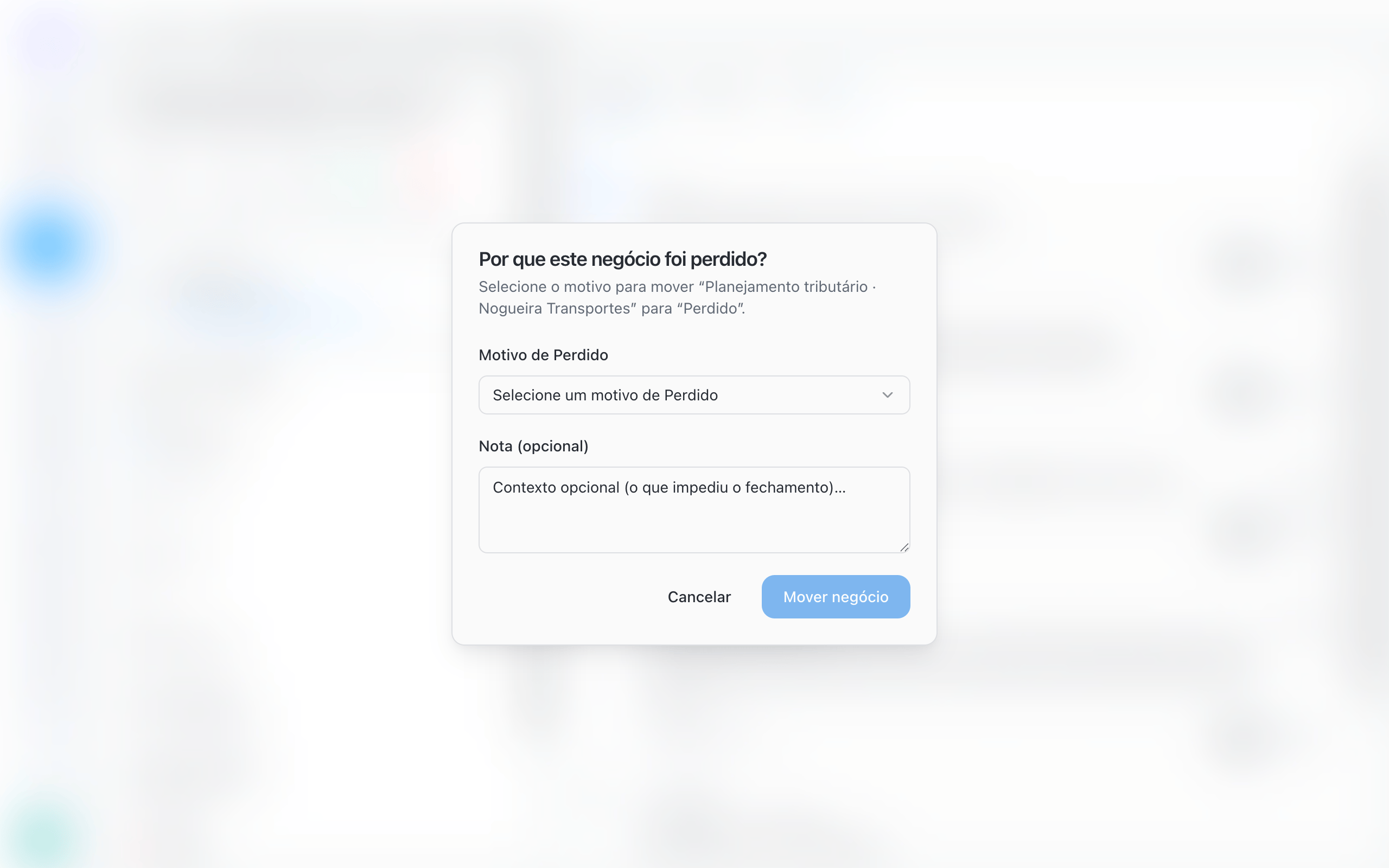 The reason and the note appear on the deal record (**Close reason** and **Close note**) and in **History**.
If the list is empty, BluBash tells you there are no reasons yet and where to add them: **Pipeline options → Edit pipeline → Reasons**.
## Do not create discard stages
A stage such as "Disqualified lead", "Not interested" or "Discarded" is not a step in the process: it is an outcome. Keeping it as a column distorts the board and hides the reason for the loss.
Add **Not qualified** (or the name your team uses) to the Pipeline's **Lost** reasons.
When a lead is not a fit, move the deal to **Lost** and choose **Not qualified**.
If the Pipeline had a discard stage, delete it in **Manage stages**. BluBash asks for an open stage to move its deals to. Then close those deals as **Lost** with the right reason.
Leave the initial screening to the AI agent: it answers leads that are not a fit and transfers only the ones with potential to your team. This way, lost reasons reflect what happens after qualification.
## Set up a Pipeline's reasons
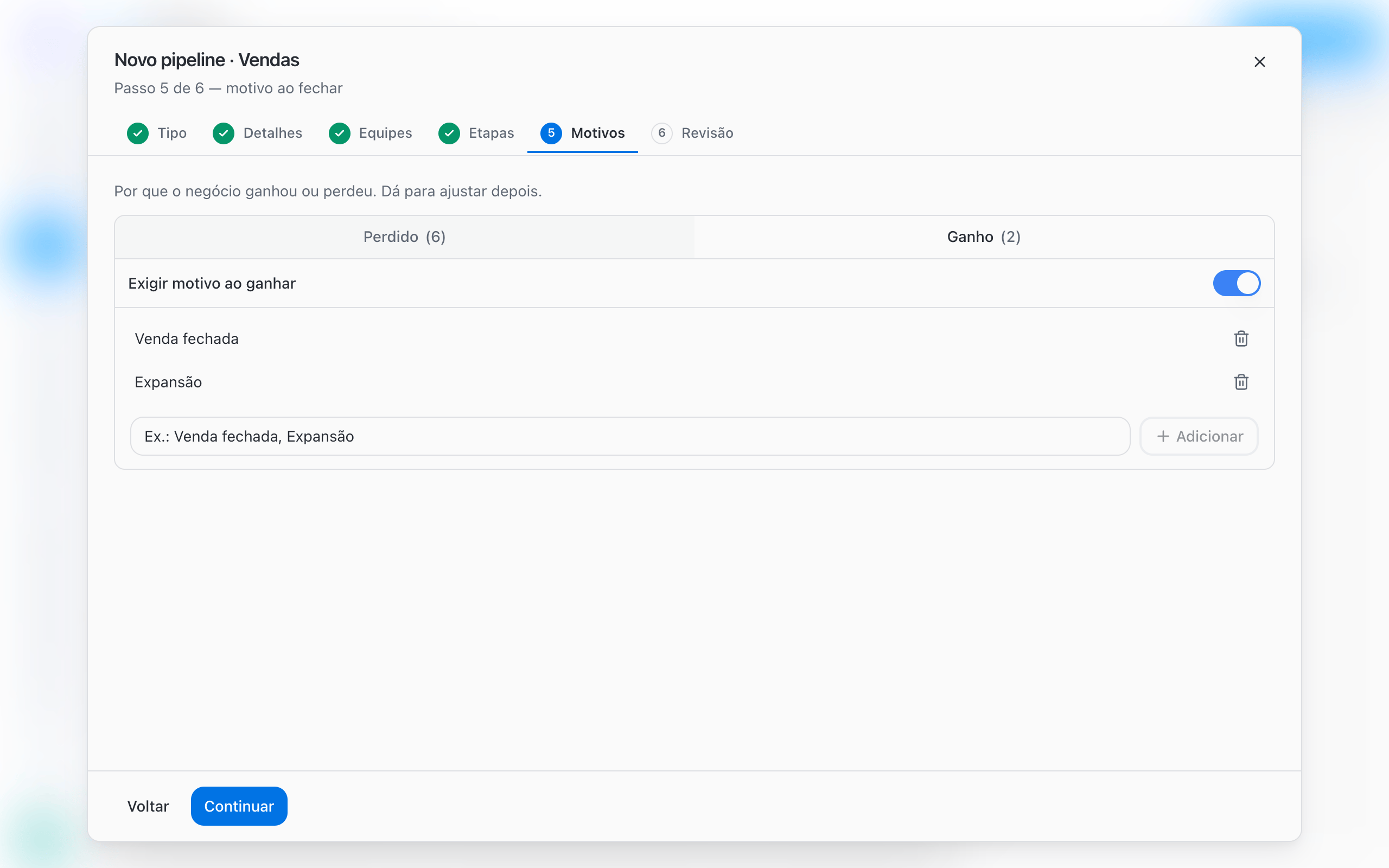
Open **Pipeline options → Edit pipeline** and go to the **Reasons** tab. When creating a Pipeline, the same settings appear in the **Reasons** step.
| Setting | What it does |
| - | - |
| **Won** list | Reasons shown when the deal reaches a Won stage |
| **Lost** list | Reasons shown when the deal reaches a Lost stage |
| **Add** | Adds a new reason to the list |
| Reason name | Click the name to rename it |
| **Delete reason** | Removes the reason from the list |
| **Require reason on win** | Makes choosing a reason mandatory when winning |
| **Require reason on loss** | Makes choosing a reason mandatory when losing |
To require a reason, the matching list needs at least one active reason. Inactive reasons are marked **inactive**.
The reason and the note appear on the deal record (**Close reason** and **Close note**) and in **History**.
If the list is empty, BluBash tells you there are no reasons yet and where to add them: **Pipeline options → Edit pipeline → Reasons**.
## Do not create discard stages
A stage such as "Disqualified lead", "Not interested" or "Discarded" is not a step in the process: it is an outcome. Keeping it as a column distorts the board and hides the reason for the loss.
Add **Not qualified** (or the name your team uses) to the Pipeline's **Lost** reasons.
When a lead is not a fit, move the deal to **Lost** and choose **Not qualified**.
If the Pipeline had a discard stage, delete it in **Manage stages**. BluBash asks for an open stage to move its deals to. Then close those deals as **Lost** with the right reason.
Leave the initial screening to the AI agent: it answers leads that are not a fit and transfers only the ones with potential to your team. This way, lost reasons reflect what happens after qualification.
## Set up a Pipeline's reasons
Open **Pipeline options → Edit pipeline** and go to the **Reasons** tab. When creating a Pipeline, the same settings appear in the **Reasons** step.
| Setting | What it does |
| - | - |
| **Won** list | Reasons shown when the deal reaches a Won stage |
| **Lost** list | Reasons shown when the deal reaches a Lost stage |
| **Add** | Adds a new reason to the list |
| Reason name | Click the name to rename it |
| **Delete reason** | Removes the reason from the list |
| **Require reason on win** | Makes choosing a reason mandatory when winning |
| **Require reason on loss** | Makes choosing a reason mandatory when losing |
To require a reason, the matching list needs at least one active reason. Inactive reasons are marked **inactive**.
 ## Reasons suggested by templates
| Template | End stages (Won / Lost) | Won reasons | Lost reasons |
| - | - | - | - |
| **Sales** | Won / Lost | Won the deal, Expansion | Price, Competition, No budget, No response, Not the right time |
| **Support** | Resolved / Cancelled | Resolved | Cancelled by customer, Duplicate, No response |
| **Onboarding** | Done / Cancelled | Onboarding completed | Customer dropped out, No engagement |
| **Collections** | Paid / Unpaid | Payment regularized | Delinquency, Cancellation |
| **Custom** | Won / Lost | None | None |
In the **Sales** template, a reason is already required when losing. In the others, turn on the requirement if you want it.
Use names your team already says out loud and keep the list short. Five to eight lost reasons are usually enough. Long lists make people pick any option.
## More than one Won or Lost stage
A Pipeline can have more than one Won stage, each with its own destination. Example for a law firm:
| Won stage | Close destination |
| - | - |
| Won · Debt | Liability management Pipeline |
| Won · Lawsuit | Legal Pipeline |
To do this, add a stage, change its **Stage type** to **Won** and set the destination for each one. With more than one end stage of the same type, the quick action on the record becomes **Win** or **Lose** and opens the list so you can choose the stage.
[Set up derivation →](/pipelines/derive-deals)
## Common issues
| Situation | Cause | How to fix |
| - | - | - |
| BluBash does not let you turn on the reason requirement | The list has no active reason | Add at least one reason to the list |
| The reason dialog does not appear | The requirement is off for that type | Turn on **Require reason on win** or **Require reason on loss** |
| Almost every lost deal has the same generic reason | The list has a vague option, such as "Other" | Replace it with specific reasons and use the note for context |
## Next steps
Create the next deal automatically when you win.
Deal record, filters and tasks.
This documentation is built and hosted on [Mintlify](https://mintlify.com), a developer documentation platform.
## Reasons suggested by templates
| Template | End stages (Won / Lost) | Won reasons | Lost reasons |
| - | - | - | - |
| **Sales** | Won / Lost | Won the deal, Expansion | Price, Competition, No budget, No response, Not the right time |
| **Support** | Resolved / Cancelled | Resolved | Cancelled by customer, Duplicate, No response |
| **Onboarding** | Done / Cancelled | Onboarding completed | Customer dropped out, No engagement |
| **Collections** | Paid / Unpaid | Payment regularized | Delinquency, Cancellation |
| **Custom** | Won / Lost | None | None |
In the **Sales** template, a reason is already required when losing. In the others, turn on the requirement if you want it.
Use names your team already says out loud and keep the list short. Five to eight lost reasons are usually enough. Long lists make people pick any option.
## More than one Won or Lost stage
A Pipeline can have more than one Won stage, each with its own destination. Example for a law firm:
| Won stage | Close destination |
| - | - |
| Won · Debt | Liability management Pipeline |
| Won · Lawsuit | Legal Pipeline |
To do this, add a stage, change its **Stage type** to **Won** and set the destination for each one. With more than one end stage of the same type, the quick action on the record becomes **Win** or **Lose** and opens the list so you can choose the stage.
[Set up derivation →](/pipelines/derive-deals)
## Common issues
| Situation | Cause | How to fix |
| - | - | - |
| BluBash does not let you turn on the reason requirement | The list has no active reason | Add at least one reason to the list |
| The reason dialog does not appear | The requirement is off for that type | Turn on **Require reason on win** or **Require reason on loss** |
| Almost every lost deal has the same generic reason | The list has a vague option, such as "Other" | Replace it with specific reasons and use the note for context |
## Next steps
Create the next deal automatically when you win.
Deal record, filters and tasks.
This documentation is built and hosted on [Mintlify](https://mintlify.com), a developer documentation platform.